Services · Custom systems · Custom digital forms
Digital forms easy to fill on any screen. Prints like the paperwork your staff already knows.
We turn paper and PDF forms into encrypted digital forms. A printed copy still matches the paperwork your staff already uses. Keep the form as it is, apply the changes your team marks up, or design a new form around how the information is actually used.
InfoStar Productions LLC · Sacramento County · Family-owned since 1993
Mon–Fri 8am–5pm PT. You’ll reach our team directly.
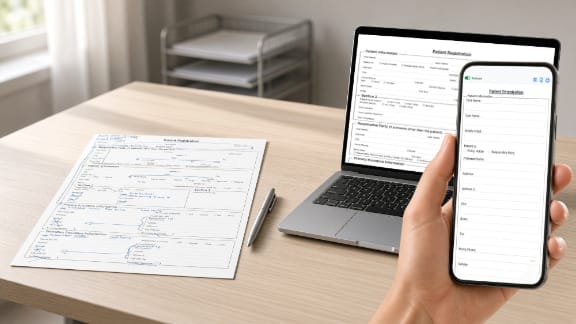
How we build it
Match the form. Edit the form. Or start new.
Most projects begin with a form the office already trusts. The useful question is whether that form should stay as it is, change where staff already know it should, or be replaced because the workflow moved on.
-
01Match the form in use
We recreate the layout, field order, and labels of the paper or PDF your staff already uses, so the digital version is familiar on the first day.
-
02Match it, with your edits
A section in the wrong place, a field nobody fills in, a label that is unclear. Mark the paper form. We build those changes into the digital version and leave the rest recognizable.
-
03Create a new form
When the paper form no longer matches the work, we design the fields, rules, and delivery around what should happen after someone submits.
From the form in the office
A paper form, marked up, then rebuilt.
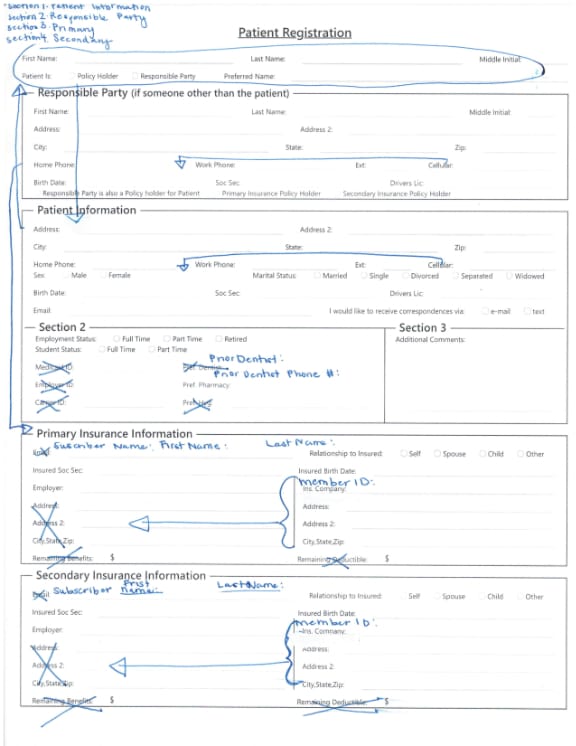
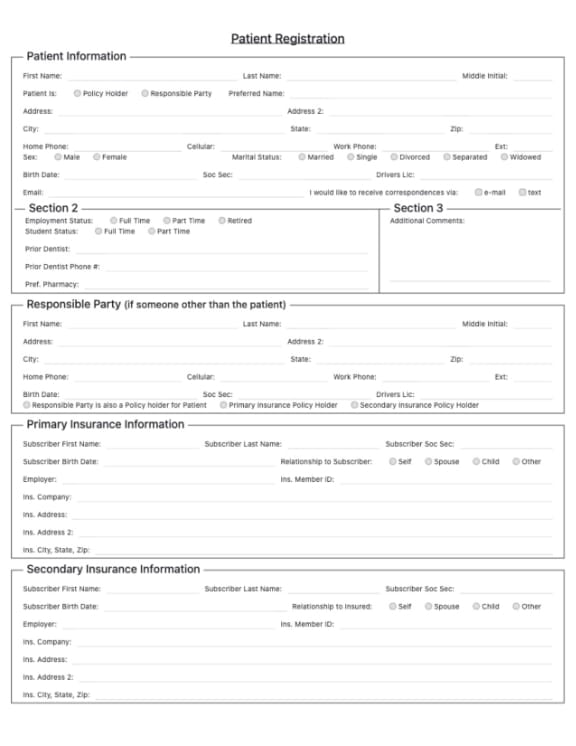
This is the first page of a patient registration form. The practice kept the form they were using and wrote the changes they wanted on it. The digital version follows those notes: sections reordered, labels clarified, unused fields removed, and the fields staff asked for added.
Paper form with staff notes
Digital form with those changes
What the project covers
Security has to cover the complete form workflow.
A secure form is more than a page with a lock icon. The project defines what is collected and what happens to it after someone presses submit.
- Information collected. The fields, files, signatures, and acknowledgments the form needs — and the ones it should not ask for.
- Encrypted transmission and storage. How a submission travels and where the record is kept.
- Authorized access. Who on the team can open a submission, and who cannot.
- Notification. Who is told that a form arrived, and what they receive.
- Retention, deletion, and logging. How long a record is kept, how it is removed, and what is logged.
- The next step. The business process that follows submission, including routing and staff follow-up.
During scoping, we document the data, vendors, access model, and applicable requirements identified by the client and its advisors so the proposed form and delivery workflow support those obligations.
Where it fits
Forms for work that already happens on paper.
-
Dental practices
Patient paperwork completed before the visit, an online balance-payment path, and referral forms for other providers. For teamPerio, the referring-doctor path collects referral details and supporting files in one place.
-
Plastic surgery and medical aesthetics
Consultation requests and patient paperwork for surgeons and med spa teams. See how this fits aesthetic practices.
-
Community organizations
Parents and guardians use secure forms to join RCPD PAL and register children for programs. The connected system applies the organization’s local eligibility requirement and carries approved information into event administration and reporting. Read the RCPD PAL case study.
-
Any other paper or PDF process
Registration, intake, consent, applications, and internal requests. We map the current process, then build the fields, validation, access, routing, storage, and follow-up that process needs.
Form requirements
Map the fields, rules, access, and next steps.
We start from the form and the work around it. The quote reflects form complexity, security and compliance requirements, data storage, outside services, integrations, administrative tools, testing, and ongoing support.
01
The form you have now
Paper, PDF, or the screen staff already work from. Send the current form and any notes about what should change.
02
The rules
Required fields, questions that appear only when they apply, signatures or acknowledgments, and attachments.
03
Where it goes
Who is notified, who can open a submission, which records are kept, and what the staff does next.
Free consultation
Let’s talk about the form you need.
Tell us what the form needs to collect, who needs access, and where the information should go. We’ll recommend what to build and provide clear pricing and a timeline.
Discuss a Secure FormCall or text InfoStar Productions LLC
Mon–Fri 8am–5pm PT. You’ll reach our team directly.